The secure, purpose-built audio appliance for language exams.
SoundWeave Education replaces improvised laptops, loose files, and network dependencies with a dedicated, offline control unit. Deliver perfectly synchronized audio to third-party silent disco transmitters with zero technical stress.
Engineered for every role in the exam hall
We built SoundWeave by listening to the distinct needs of Exams Officers, Invigilators, and IT Managers. The result is a system that satisfies strict regulations without compromising usability.
- ✓ Compact Security: Fits inside your existing exam safe alongside the papers.
- ✓ Zero-Footprint Mode: Run exams directly from a USB stick so confidential data never touches the device's internal drive.
- ✓ Delegated Compliance: A foolproof 1-touch wipe button allows staff to clear files instantly, satisfying JCQ rules without calling IT.
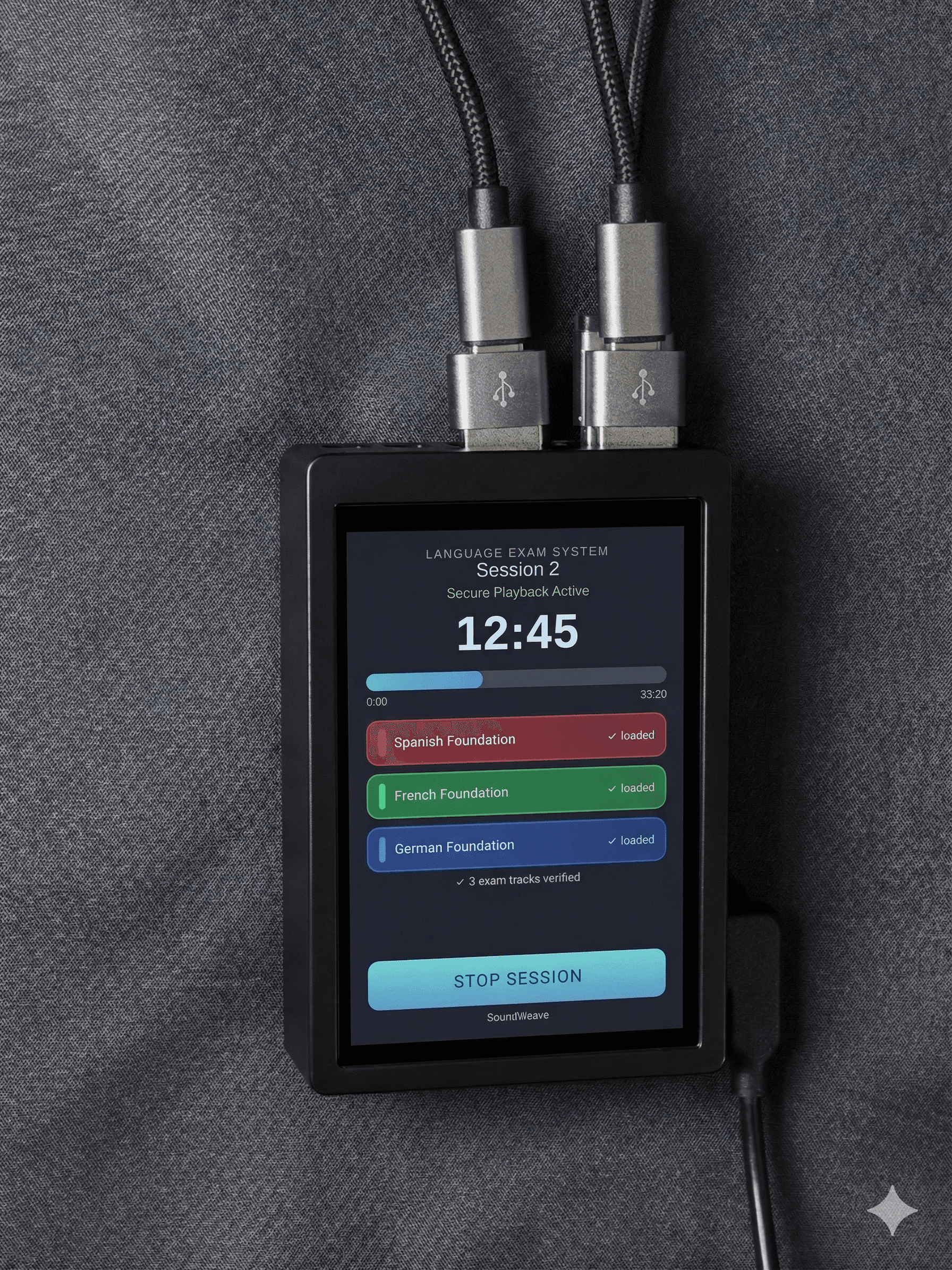
- ✓ Visual Confidence: The interface clearly displays that the Red, Green, and Blue channels are actively broadcasting.
- ✓ Locked-In Safety: IT can PIN-lock the device. Your only job is to press "Play" — you literally cannot mess it up.
- ✓ Hot-Swap Resilience: If a student's third-party headset fails, just hand them a spare. No pausing the system, no pairing, no disruption.
- ✓ True Air-Gapped Appliance: 100% offline. No network exposure, no Wi-Fi, and zero software updates required.
- ✓ Infection-Proof: The OS restricts USB interactions strictly to copying or playing valid MP3 files, neutralizing malware risks.
- ✓ Role-Based Access: PIN-lock the setup in the morning. Once configured, IT is completely removed from the exam delivery process.
How SoundWeave fits into your exam setup
SoundWeave is the secure "brain" of your audio delivery. It integrates seamlessly with standard rental equipment to create a flawless exam environment.
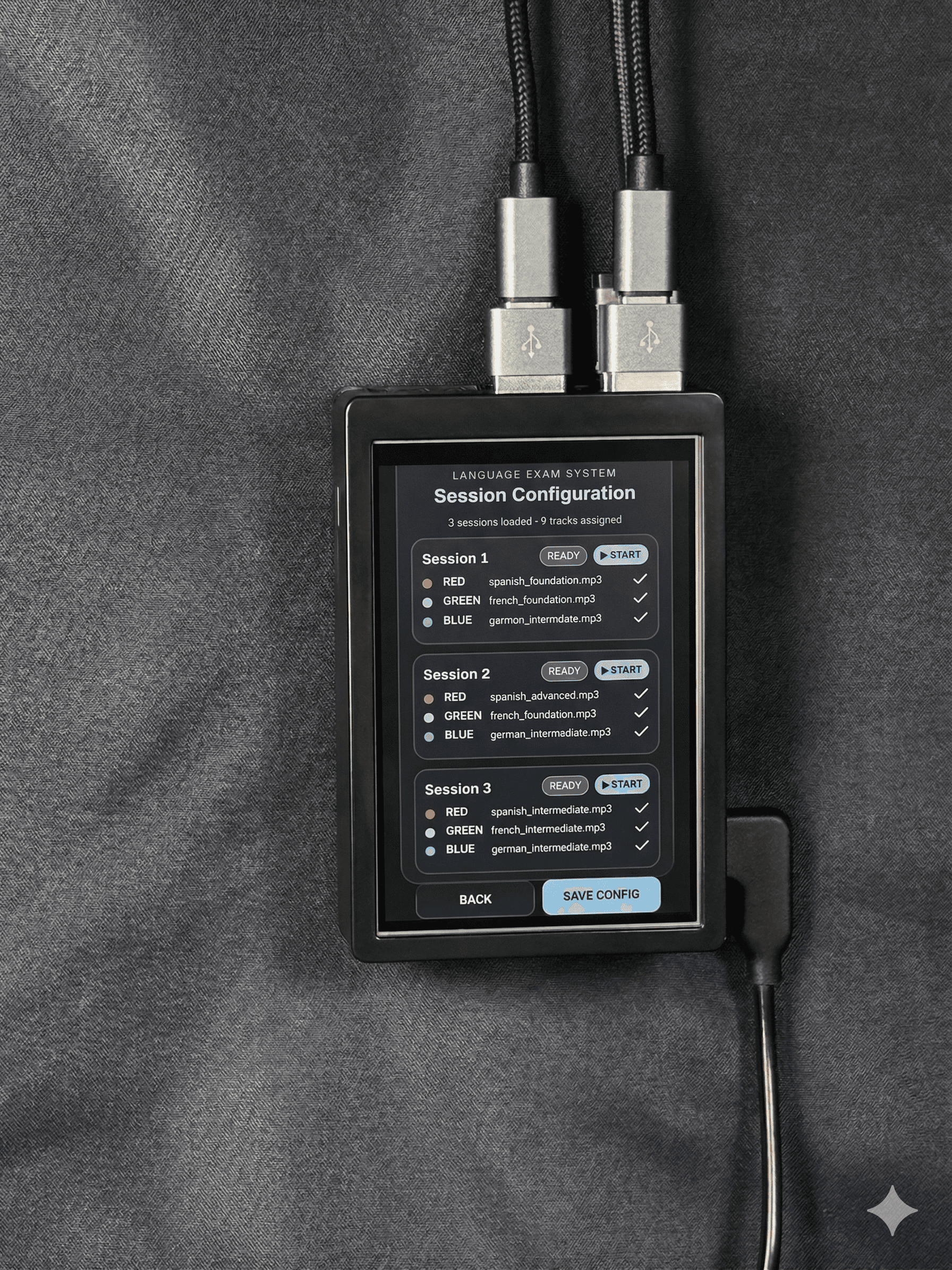
- 1Load Securely (Configuration View)IT or the Exams Officer assigns the MP3s to the correct color channels via the configuration screen, then PIN-locks the session to prevent tampering.
- 2Control Playback (Invigilator View)The Invigilator views the active channels on the locked-down screen and presses play. No technical knowledge required.
- 3Broadcast ExternallyAudio feeds directly into third-party silent disco transmitters, pushing audio to pre-paired student headsets. (Transmitters and headsets supplied by rental partner).
Ecosystem Boundaries
Frequently Asked Questions
What is the step-by-step process for getting the exam audio onto the system?
The workflow is simple, secure, and perfectly aligns with standard procedures:
- Download: Your Exams Officer or IT team downloads the official MP3 file from the exam board's secure extranet.
- Save: The file is saved directly onto a standard or encrypted school USB stick.
- Play or Transfer: Plug the USB stick into the SoundWeave appliance. From there, you can securely copy the files to the device's internal storage, OR you can play the exam directly from the USB stick ("Zero-Footprint Mode") so no confidential data is ever stored on the rental hardware.
Can the system be used for mock exams as well as the real assessments?
Absolutely, and we highly recommend it. Renting the SoundWeave system alongside silent disco hardware for your winter or spring mock exams is the best way to ensure your invigilators are confident with the 1-touch controls, and that students are comfortable wearing and adjusting the headsets long before the high-stakes summer exams.
How does SoundWeave help us comply with JCQ file clearing rules?
JCQ dictates that devices must be cleared of files before a subsequent exam. SoundWeave offers two solutions: a 1-touch "Wipe Session" button that invigilators can use instantly, or a "Zero-Footprint" mode where the exam plays directly from your encrypted USB stick, meaning no files are ever stored on the device itself.
Does the system require Wi-Fi or network access?
No. JCQ regulations strictly prohibit internet access during listening exams. SoundWeave is a true air-gapped appliance. It requires no Wi-Fi, no network cables, no logins, and will never force an automatic software update right before an exam begins.
What happens if a student's headset fails during the exam?
Because SoundWeave pushes a continuous broadcast to your rental provider's silent disco transmitters, all headsets are pre-paired to the room. If a student's headset breaks, the invigilator simply hands them a spare. There is no need to pause the SoundWeave system or pair devices mid-exam.
How do we manage JCQ action logging with this device?
JCQ requires Exams Officers to log when files are downloaded, stored, and cleared. We are looking for partners to collaborate with to refine this solution prior to the 2027 exam season.
Ready to secure your listening exams?
If you are exploring more controlled audio delivery for language exams and want to move away from improvised laptops and stressful setups, we would be happy to show you how SoundWeave works.